

Listen to the article
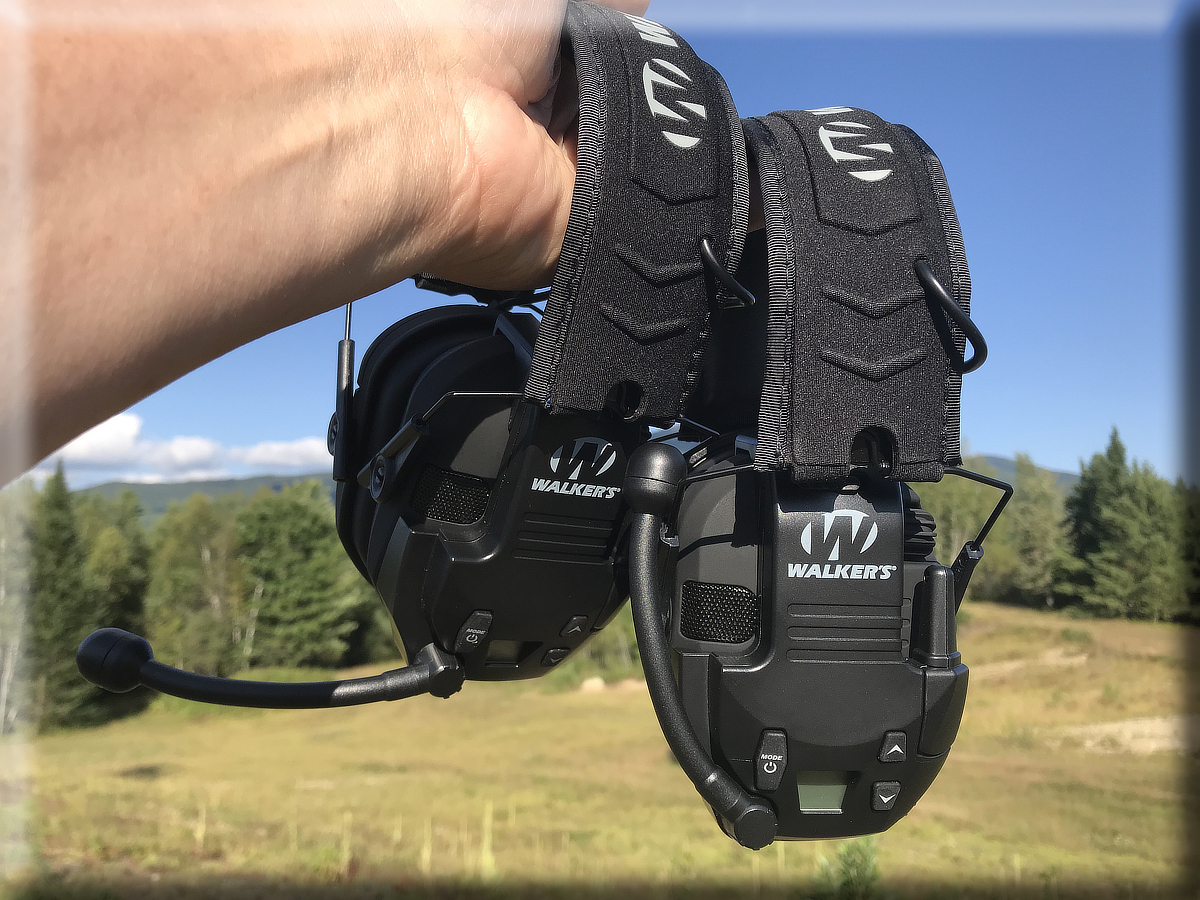
I bought two sets of Walker Razor electronic muffs mainly because I wanted to try the clip-on Walkie Talkie attachment. The idea made sense. You could keep your hearing protection on and talk with someone else without carrying another radio.
Walker advertises the radio attachment for communication out to 2 or 3 miles. In my real-world testing, I didn’t get anything close to that. But that’s not really a criticism. At the distances where I would actually use these, they worked quite well.
I’ll show you exactly how far mine worked, including what happened with trees and terrain between the two radios. I’ve also added the complete Walker Razor Walkie Talkie frequency list, since quite a few people are looking for it.
As an Amazon Associate I earn from qualifying purchases (no extra cost to you).
Walker Razor Walkie Talkie Attachment:
→ View on Amazon
The current Walker attachment has 22 channels, 99 sub-channels, push-to-talk and VOX operation. Walker specifies three AAA batteries and approximately 12 hours of battery life.
Walker Razor Walkie Talkie Frequency List
The Walker Razor Walkie Talkie uses the standard 22 FRS/GMRS channels.
These are UHF frequencies in the 462 and 467 MHz range. The FCC lists the same 22 channel center frequencies for FRS, with all 22 also shared with GMRS.
| Channel | Frequency |
|---|---|
| 1 | 462.5625 MHz |
| 2 | 462.5875 MHz |
| 3 | 462.6125 MHz |
| 4 | 462.6375 MHz |
| 5 | 462.6625 MHz |
| 6 | 462.6875 MHz |
| 7 | 462.7125 MHz |
| 8 | 467.5625 MHz |
| 9 | 467.5875 MHz |
| 10 | 467.6125 MHz |
| 11 | 467.6375 MHz |
| 12 | 467.6625 MHz |
| 13 | 467.6875 MHz |
| 14 | 467.7125 MHz |
| 15 | 462.5500 MHz |
| 16 | 462.5750 MHz |
| 17 | 462.6000 MHz |
| 18 | 462.6250 MHz |
| 19 | 462.6500 MHz |
| 20 | 462.6750 MHz |
| 21 | 462.7000 MHz |
| 22 | 462.7250 MHz |
That also means you can communicate with other compatible FRS radios when both radios are set to the same channel and compatible sub-channel setting. Walker’s manual specifically says the radio supports standard GMRS/FRS channels 1 through 22.
👉 GMRS Emergency Channel: Which Channels Should You Monitor?
How Far Does the Walker Razor Walkie Talkie Really Work?
This was the part I really wanted to know.
Walker advertises communication out to 2 or 3 miles. I approach advertised walkie talkie distances with a healthy amount of skepticism. Those numbers usually depend on unusually good line-of-sight conditions.
So I did my own test.
Up to about 300 feet, the Walker radios sounded solid and clear. That included direct line of sight, going down a hill, and putting some trees between the radios.
Then I started stretching out the distance.
Here is approximately what I experienced:
| Distance | My Results |
|---|---|
| 300 feet | Solid and clear |
| 600 feet, open field | Still pretty good, slight noise |
| 600 feet, trees and terrain | Noticeably noisy |
| 800 feet | Communication becoming annoying |
| 1,000 feet | Pretty poor |
| About 1,300 feet | Communication essentially impossible |
Those distances are from my own test and my own terrain. Your results could be better or worse.
The interesting comparison happened at about a quarter mile.
By then, communication between the two Walker units had fallen apart. I had brought a handheld BaoFeng radio along during the test. When I transmitted with that radio instead, Mrs. J reported that it came through loud and clear.
That’s about what I expected.
The Walker is a tiny radio attached to an earmuff with a short antenna. I don’t look at it as a replacement for a regular handheld radio.
For talking to somebody nearby while shooting, working around the property, or doing something else where both people are wearing hearing protection, that’s a different story. A few hundred feet can be plenty.
Walker Razor Slim Muffs With the Radio Attachment
I originally used the radio attachment with the Walker Razor Slim electronic muffs.
I like the Slim muffs themselves. One thing that surprised me was how much ambient sound I could hear when I turned up the volume. They were better than some of my other electronic muffs in that regard.
The slim ear cups are also nice when shooting a rifle. There’s less bulk around the stock when getting your cheek down behind the sights or optic.
The current Razor Slim has a 23 dB NRR rating, two omnidirectional microphones, sound-activated compression, and an audio input jack. It runs on two AAA batteries.
Walker Razor Slim Electronic Muffs:
→ View on Amazon
The Walkie Talkie attachment itself has its own batteries and controls.
Which Walker Razor Muffs Does the Walkie Talkie Fit?
My own experience is with the Razor Slim, so that’s the combination I can personally confirm.
Walker’s current product page now says the GWP-RZRWT attachment integrates with its Razor Series muffs. The older Walker instruction manual specifically describes attaching it to a Razor Slim muff.
If you already own another version of the Razor muff, I would check the mounting arrangement and audio connection before ordering rather than assuming every older variation is identical.
Walker currently says the attachment integrates with its Razor Series muffs. However, some retailer listings specifically exclude certain Razor models such as the Razor Quads. My own experience is with the Razor Slim, so I would verify compatibility with your exact model before ordering.
There’s also a newer Bluetooth version of the Razor Walkie Talkie attachment. Walker says it adds Bluetooth 5.0 for phone calls and audio while retaining the walkie talkie features. My range testing in this article was done with the standard non-Bluetooth attachment, not the newer Bluetooth version.
What Are the 99 Walker Razor Sub-Channels?
The Walker has 22 actual radio channels, but the display also lets you select one of 99 sub-channels.
Don’t interpret that as 99 additional radio frequencies.
Walker’s manual explains that selecting a sub-channel makes your radio receive transmissions from radios using the same main channel and the same sub-channel setting. It’s useful when several groups are using the same radio channel.
There’s an important catch.
Another radio listening to the main channel can still receive your transmission even if it isn’t using your sub-channel setting. In other words, a sub-channel is useful for reducing what you hear. It isn’t a private radio channel.
That’s worth knowing if you’re using these around other groups.
Push-to-Talk vs. VOX
The Walker radio gives you two ways to transmit.
You can press the transmit button normally, or turn on VOX so the radio automatically transmits when it hears you speak.
I experimented with VOX and didn’t care for it.
There are two sensitivity choices, but I found the feature troublesome. It didn’t always trigger the way I wanted. Personally, that doesn’t bother me because I would rather use the push-to-talk button anyway.
The button is easy to reach on the side of the headset. Press it, talk, let go.
Walker still provides high and low VOX sensitivity settings on the current model. Low sensitivity is intended for environments with more outside noise, while high sensitivity is intended for quieter conditions.
For me, PTT is simpler.
The Priority Channel Feature Is Actually Useful
One feature that could be easy to overlook is the priority channel.
You can use your normal channel for conversation while telling the Walker to monitor a second channel. The manual gives the example of a range master using another channel to announce a cease-fire.
The priority channel can be any of the other 22 channels besides your main channel. If traffic appears there, the headset switches over so you can hear it. You cannot transmit while you’re receiving the priority-channel transmission.
For a range or organized group, I can see where that would be useful.
Where I Think the Walker Razor Radio Makes Sense
I wouldn’t buy this expecting a long-range radio.
That’s not what impressed me about it.
What I like is having communications built into hearing protection I’m already wearing. For two people at a shooting range, a couple people working around property, or other fairly close-range situations, it’s convenient.
I’ve even thought about using them during winter. The muffs keep your ears warm, cut the noise from equipment such as a snowblower, and still give you a way to communicate with somebody back at the house.
My test showed that 300 feet was easy. At 600 feet, terrain and trees began making a noticeable difference. By the time I reached roughly a quarter mile under those conditions, the Walker-to-Walker connection was gone.
That’s a long way from the advertised 2 to 3 miles.
But for what I would actually use the Walker Razor Walkie Talkie for, I still think the concept works.
👉 Best Antenna For BaoFeng Handheld Radios
👉 Walkie Talkie Range – Distance
Read the full article here
6 Comments
I’ve been following this closely. Good to see the latest updates.
Good point. Watching closely.
Solid analysis. Will be watching this space.
This is very helpful information. Appreciate the detailed analysis.
Interesting update on Walker Razor Walkie Talkie Review: Real-World Range & Frequency List. Looking forward to seeing how this develops.
Great insights on Hunting. Thanks for sharing!